
How to make a YouTube thumbnail
Free in your browser, nothing to install: try this in BoboCreate Online.
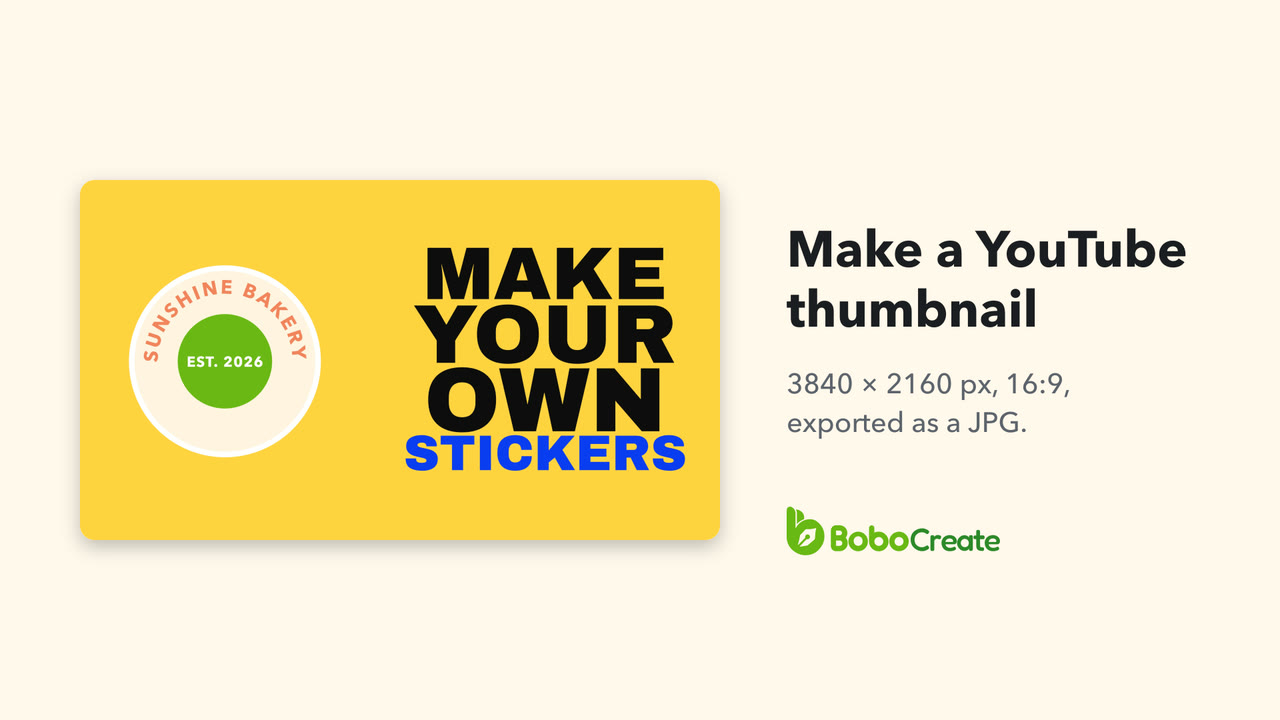
Start a design at Thumbnail 1280 × 720 px, add a picture and a few big words, and export it with Export › JPG at 3×. That makes a 3840 × 2160 pixel JPG, the size YouTube recommends for a video thumbnail. In YouTube Studio, open the video's details and upload it under Thumbnail.

YouTube's thumbnail size
YouTube's help page for custom thumbnails asks for these. Its own advice is to make the picture as large as you can.
| Recommended size | 3840 × 2160 px |
|---|---|
| Smallest width | 640 px |
| Shape | 16:9 |
| File type | JPG or PNG |
| Largest file | 50 MB from a computer, 2 MB from a phone |
| Your account | Verified, to upload a thumbnail of your own |
BoboCreate's Thumbnail size is 1280 × 720, which is also 16:9. Every pixel of the page becomes three when you export at 3×, so 1280 × 720 comes out at 3840 × 2160.
Make it in BoboCreate
-
Start at the Thumbnail size
In the library, click New design. Type thumb in the Size box to find Thumbnail 1280 × 720 px and choose it. Give the design a name, and click Create.
-
Give the page a colour
With nothing selected, the panel on the right shows Page 1 · background. Click its colour and type a colour code. The one here is #ffd23f.
-
Add your picture
Click Image in the toolbar and choose a picture. Under Transform, type its width; the height follows. Then drag it into place.


Add a few big words
-
Add a text template
Open Text in the side bar. Under Templates, click Show all next to Bold & Impact, and click a template to add it. Drag it beside the picture.
-
Change the words
Double-click a line and type, or type in the box at the top of Text Style. If a new word is longer than the old one, give that line a smaller size in the Size box. Then draw a box round the lines and click Align centres horizontally, so they line up again.


Export a JPG at 3×
Click Export, then JPG. Set Resolution to 3× — 3840 px wide; it starts at 2×. The line under it should read 3840 × 2160 px. Click Export JPG and choose where to save it.

Give the picture enough pixels
At 3× each pixel of the page becomes three in the file, and that goes for the picture too. A picture shown 400 px wide on the page is 1200 px wide in the file, so it needs at least 1200 pixels of its own to stay sharp. The sticker here is a 1200 × 1200 PNG, made in BoboCreate with Export › PNG at 600 DPI. With a smaller picture, show it smaller on the page, or use a larger copy of it.
Then, in YouTube Studio
-
Open the video's details
Sign in to YouTube Studio, choose Content in the menu on the left, and click the pencil (Details) on your video.
-
Upload the thumbnail
Under Thumbnail, click Upload file and choose the JPG. Then click Save.
YouTube says the new thumbnail can take a while to show, and that a channel can upload only so many custom thumbnails a day.
For a Short, YouTube asks for 9:16 instead, 2160 × 3840 px, and you add it in YouTube Studio on a computer. In BoboCreate, start a design at Custom… with Width 720, Height 1280 and unit px, and export it at 3×: that makes 2160 × 3840. (The Story size makes 1080 × 1920 at 2×, the same shape but smaller.)
What YouTube suggests
- Use the rule of thirds, and put your branding and a few descriptive words over the picture.
- If you add words, use a font that is easy to read.
- Keep the design simple. Bold colour catches the eye, but too much overwhelms it.
Where it goes wrong
- You can't upload a thumbnail of your own. Custom thumbnails need a verified account; verifying your phone number is enough. In YouTube Studio, Settings › Channel › Feature eligibility shows what your channel can use.
- The picture looks soft. It has fewer pixels than it covers in the file. Use a larger copy, or show it smaller on the page.
- The file is too large to upload from a phone. The phone limit is 2 MB. The thumbnail here is 281 KB as a JPG and 472 KB as a PNG; a design that is mostly photo makes a larger file.
Sources
The sizes, limits and YouTube Studio steps are from YouTube's help pages:
- Add custom thumbnails on YouTube
- Learn about feature access for YouTube Creators
- Thumbnail & title tips
YouTube is a trademark of Google LLC. BoboCreate is not affiliated with or endorsed by YouTube or Google.
Start it free in your browser
Make the whole thumbnail online and download it at 1280 × 720. The larger export this guide uses is in the BoboCreate app.
BoboCreate Online is free, with no account. Its downloads carry a small “Made with BoboCreate” mark; the BoboCreate app exports without it, and adds photos, video, cutting files and print quality.